The Interfero class
Interfero is a handle class.
Properties
name |
type |
default |
description |
|---|---|---|---|
|
(:,:) double |
interferogram data |
|
|
Interfero |
reference interferogram |
|
|
char |
interferogram file name on the computer |
|
|
char |
folder of the interferogram file |
|
|
int |
Number of columns |
|
|
int |
Number of rows |
Constructor
Constructor
Synthax
obj = Interfero()
obj = Interfero(n)
obj = Interfero(fileName, MI)
obj = Interfero(mat, MI)
obj = Interfero(___,Name,Value)
obj = Interfero() creates an empty Interfero object.
objList = Interfero(n) create a n-vector objList of empty Interfero objects.
obj = Interfero(fileName, MI) creates a Interfero object obj from a specified file fileName and a given Microscope object MI.
obj = Interfero(mat, MI) creates a Interfero object obj from a matrix mat and a given Microscope object MI.
The Interfero constructor accepts Name-Value options.
Examples
Build an Interfero object from matrices
itf = imread('data/Itf.tif');
ref = imread('data/Ref.tif');

MI = Microscope(100);     % creates a microscope with 100x magnification

Itf = Interfero(itf, MI); % creates the Interfero object
Itf.Reference(ref);       % associates the reference
Build an Interfero object from files
MI = Microscope(100);     % creates a microscope with 100x magnification

Itf = Interfero('data/Itf.tif', MI); % creates the Interfero object
Ref = Interfero('data/Ref.tif'; MI); % creates the reference Interfero object

Itf.Reference(Ref);       % associates the reference
Use GPU
MI = Microscope(100);     % creates a microscope with 100x magnification

Itf = Interfero('data/Itf.tif', MI, 'gpu', true); % creates the Interfero object
Ref = Interfero('data/Ref.tif'; MI, 'gpu', true); % creates the reference Interfero object

Itf.Reference(Ref);       % associates the reference
In this example, the Itf properties are stored in the graphics card, for further GPU computation.
Automatic import from a folder
Usually to build Interfero objects, the constructor is not directly used. One often automatically import interferograms from a folder using The importItfRef function.
CGcam = CGcamera('Silios_mono');
MI = Microscope(100, 200, CGcam, 'PhaseLIVE'); % creates a microscope with 100x magnification

Itf = importItfRef('data', MI);  % creates the Interfero object
Itf is a vector of interferograms, and the reference are automatically detected provided a software (here PhaseLIVE) correctly indicated when defining the microscope MI.
Interfero methods
clearFcrops
Clear the FcropParameters settings of the reference Interfero.
Synthax
obj.clearFcrops()
Description
obj.clearFcrops() resets the value of obj.Ref.Fcrop.
obj can be a list (vector) of Interfero objects.
crop
Crop the image and reference interferograms.
Synthax
obj.crop()
obj.crop(Name, Value)
objList.crop(___)
obj2 = obj.crop(___);
Description
obj.crop() crops the obj.Itf and obj.Ref.Itf images, identically. A figure window opens, inviting the user to click on the image to define a square area centered in the middle of the image.
Interfero objects vectors can also be used with this method. The transformation applies then to all the objects of the vector.
If an output is used, obj2, then the object is not modified, and is duplicated.
Name-value arguments
Note
Specify optional pairs of arguments as Name1 = Value1, ..., NameN = ValueN, where Name is the argument name and Value is the corresponding value. Name-value arguments must appear after other arguments, but the order of the pairs does not matter.
Example:
obj.crop(___,'Center','Manual','Size',300)
The Name-Value arguments in the crop method are used to define how the reference area is chosen. This reference area is the one that will feature a no-tilt when the tilt correction will be applied. When some arguments are set to 'Manual', a figure appears so that the user can select this area, in 1 or 2 clicks.
'Center'With
crop(___,'Center','Manual'), the user has to first click on the center of the reference area. If the argument is set to'Auto', then this step is skipped, and the center is automatically set to the center of the image. Also, the user can indicate the coordinates of the center:crop(___,'Center',[x_c, y_c]).'Size'With
crop(___,'Size','Manual'), once the center is defined (either manually or automatically), the user has to click on the figure to define the shape of the area, around the center point. The user can also indicate the dimensions of the reference area:crop(___,'Size',Npx)for a square area, orcrop(___,'Size',[Nx, Ny])for a rectangular area.'twoPoints'Instead of using the
'Center'and'Size'keywords, one can also click on two opposite corners of the reference area, usingcrop(___,'twoPoints',true).'params'One can also direclty write the coordinates of the crops, using
crop(___,'params', [x1, x2, y1, y2]). In this case, no figure pops up.
crossTalkCorrection
Correct for the crosstalk on 2-color cameras.
Synthax
[objG2, objR2] = crosstalkCorrection(obj1, obj2);
[obj] = crosstalkCorrection(obj1, obj2);
[obj] = crosstalkCorrection(obj0);
Description
obj1 and obj2 are supposed to be the two (vectors of) interferograms originating from the same 2-color camera sensor. Because of the cross-talk, some intensity of one color leaks over the dexels of the other color. To correct for this effect and retrieve the two original color images objG2 and objR2, there exists an algorithm that this method calls. The correction depends on two leakage parameters, which are contained in the MI.CGcam.Camera object. Hence, it is important to properly indicate the color camera when defining the microscope. For instance:
CGcam=CGcamera('Silios_color');
If only one output obj is specified, then the output consists of a 2-column array of Interfero objects, one column for each color.
If only one input obj0 is specified, then the PhaseLAB assumes it is a 2-column array of Interfero objects, one column for each color, and it returns also a 2-column array of Interfero objects obj.
% define the microscope
CGcam=CGcamera('Silios_color');
MI=Microscope(100,200,CGcam,'PhaseLIVE');

% import the images
Itf = importItfRef(folder,MI);

% create two corrected color images
Itf2 = Itf.splitColors();  % 2-column Interfero array
Itf2c = crosstalkCorrection(Itf2); % 2-column Interfero array, where the crosstalk is corrected
mean
Computes the average interferogram from a series of interferos.
Synthax
obj = mean(objList);
Description
objList is a vector of Interferogram images. mean(objList) returns a single interferogram where the properties Itf is an image that is the average of the Itf images of all the interferograms of objList. The method is also applied to the Itf.Ref Interfero object, so that the average is also performed on the reference images.
QLSIprocess
Process and return the intensity and wavefront images.
Synthax
% prototypes
Im = QLSIprocess(Itf, IL);
ImList = QLSIprocess(ItfList, IL);
ImList = QLSIprocess(___, Name, Value);

% examples
Im = QLSIprocess(Itf, IL,...
        "Fcrops", [], ...
        "method", 'Tikhonov', ...  % 'Tikhonov', 'Errico', or 'CPM'
        "defintion"; 'high', ...  % 'high' or 'low'}
        "Fcropshape", 'disc', ...  %'disc' or 'square'
        "Smatrix", [], ...
        "apodization", [], ... % true, 1, or the width of the apodization in px
        "saveGradients", false, ...
        "remotePath", [], ...
        "Tnormalisation", true, ... % or false or 'subtraction'
        "RemoveCameraOffset", false, ...
        "auto", true, ...   % Find automatically the spot of highest intensity
        "noRef", false, ... % Do not consider the Ref interferogram to compute the DW and OPD images
        "CGdistanceList", [], ...
        "resetCrops",  false, ...
        "display",  false, ...  % display the crops, even when automatic
        "unwrap", false);
Description
Method of the class Interfero that transforms the interferograms into intensity and wavefront images. As a second input, the illumination must be specified.
The method also works with an Interfero array, and returns an ImageQLSI array: ImList = QLSIprocess(ItfList, IL);
Name-value inputs
"Fcrops"Enables the use of predefined crops in the Fourier space, meaning that the automatic detection of the diffraction orders is cancelled. Predefined crops normally originate from a previous QLSIprocess use. When processing an Interfero object using QLSIprocess, the crops are saved as a property of the returned ImageQLSI object. Here is an example:
IM1 = QLSIprocess(Itf1, IL);
IM2 = QLSIprocess(Itf2, IL, "Fcrops", IM1.Fcrops);
"method"Selects the integration method used to get the wavefront image from the two gradients.
The Tikhonov method uses the grad2surf toolbox developed by Matthew Harker and Paul O’Leary. It is fast and does not create artefacts on the borders of the images.
The Errico method uses the intgrad2 toolbox developed by John D’Errico. It is slower than Tikhonov.
The CPM method uses the standard integration algorithm based on Fourier tranforms:
It is fast, but occasionally creates rebounds on the boundaries of the wavefront images:
"defintion"Tells whether the process gives high definition or low definition images.
There is neither more information nor more spatial resolution in the high-definition images. However, the images look much better in this mode. Here is an example of high versus low definition images:
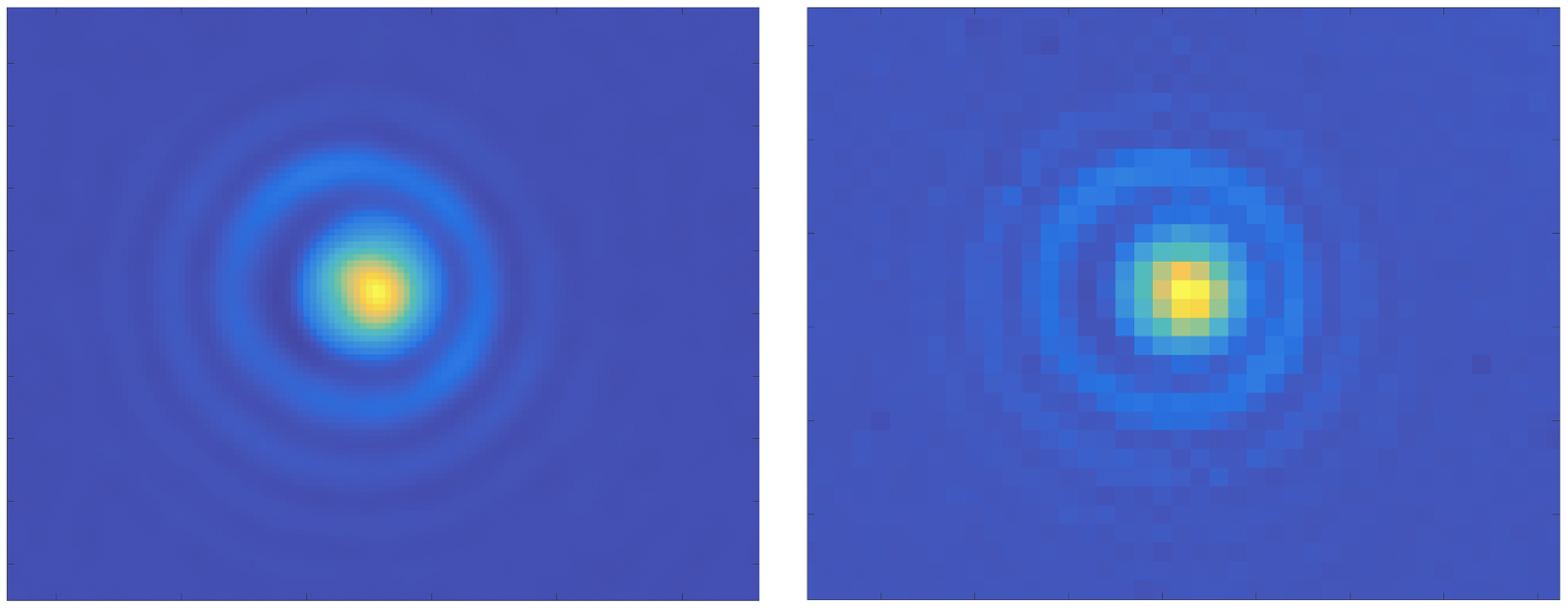
High- versus low-definition algorithm, with the wavefront image of a nanoparticle.
"Fcropshape"Tells whether the crops in the Fourier space are circular (by default) or square. Does not change much the processed images.
"apodization"Performs an apodization on the interferogram images to avoid possible artefacts after Fourier transforms. By default, when the value is 1 or true, the apodization is 20 px wide. For another width, the value should equal the width in pixels. Here are some examples:
Im = QLSIprocess(Itf, IL, "apodization", false); % no apodization
Im = QLSIprocess(Itf, IL, "apodization", true);  % apodization of 20 px
Im = QLSIprocess(Itf, IL, "apodization", 40);    % apodization of 40 px
"saveGradients"Save the gradients with the properties DWx and DWy of the returned ImageQLSI object.
Im = QLSIprocess(Itf, IL, "saveGradients", true);
dynamicFigure('ph', Im.DWx, 'ph', Im.DWy)
"remotePath"If not empty, the intensity and wavefront images are not saved in the RAM of the comptuer, but on the hard disk. The value of remotePath specifies the folder where the images should be saved. It is useful when working with a large set of images, likely to saturate the RAM.
"Tnormalisation"Sets the way the intensity image is normalized. By default, it is divided by the intensity image of the reference image. To avoid that, one can set the value to false. One can also choose to normalize by subtracting the intensity image of the reference, using the value 'subtraction' (relevant when working with fluorescence images for instance).
"RemoveCameraOffset"Removes the offset on the interferogram images, set by the camera constructor. Useless for the reconstruction of the wavefront image. Relevant when quantitative intensity images are seeked. The offset value to substract is indicated in the specification file of the camera included when building the Microscope object.
"auto"If true, finds automatically the 0 and 1st order spots in the Fourier space. If false, a window opens to ask the user to click on the spots. See the Process experimental images section for more details.
"noref"If true, forgets about the reference interferogram in the intensity and wavefront images processing.
"CGdistanceList"If the input is an Interfero array, and if the images have been acquired with various values of grating-camera distances \(d\), the list of \(d\) values can be indicated as a double array here. The array must have as many values as the number of Interfero objects.
"resetCrops"Resets the crops between each processed interferogram, to make sure the algorithm enables the user to click for each image when "auto = false".
"unwrap"Uses an unwrapping algorithm. Not useful in most cases. Slows down a bit the image processing. Algo based on this Matlab package.
Reference
Defines the reference interferogram of an Interferogram object.
Synthax
obj.Reference(ref);
objList.Reference(ref);
objList.Reference(refList);
Description
ref is an Interfero object supposed to be the reference interferogram of the Interfero obj. The method Reference assigns ref as the reference of obj.
obj can be a list (vector) of interferogram. In that case, ref is assigned to all of them, without being duplicated.
ref can be a list (vector) of interferogram, as long as it has the same number of objects as obj. in that case, the reference interferograms of ref are assigned one by one to the interferograms of obj.
removeOffset
Substract an number, or an image to the interferogram image.
Synthax
obj.removeOffset()
obj.removeOffset(val)
obj2 = obj.removeOffset(___);
Description
obj.removeOffset() removes from Itf, by default, the value of the pixel of weakest intensity in the Itf image.
obj.removeOffset(val) remove val, which can be a number, or a matrix of the same size as Itf.
If an output argument obj2 is specified, obj is not modified, but duplicated.
Warning
It only removes the offset to the Itf property, not to the reference Ref.Itf.
sizeof
Returns aand displays the size of the object occupied on the RAM of the computer, in Kilobytes (Kb).
Synthax
val = obj.sizeof();
Description
>> Itf.sizeof;

1.01e+08 Ko
splitColors
Extract the two color interferograms from one interferogram acquired with a 2-color camera.
Synthax
Itf_multi = splitColors(Itf);
Description
This method extracts the different color channels of an Interfero object, into an array of Interfero objects Itf_multi. If Itf is an array of \(N\) Interfero objects, then Itf_multi is an array of \(N\times2\) Interfero objects, where each column is a color.
square
Transforms rectangle interferograms to square interferograms by cropping.
Synthax
obj.square()
objList.square(___)
obj2 = obj.square(___)
Description
obj.square() crops the images of the Interfero object so that they are square. To define the size of the square, the smallest image dimension is considered (min([obj.Nx, obj.Ny])).
Interfero objects vectors can also be used with this method. The transformation applies then to all the objects of the vector.
If an output is specified, obj2, then the object is not modified, but duplicated.
spotRemoval
Removes undesired spots in the Interferogram Fourier space.
Synthax
obj.spotRemoval()
obj.spotRemoval(mask)
objList.spotRemoval(___)
obj2 = obj.spotRemoval(___);
[obj2, mask] = obj.spotRemoval();
Description
This methods opens a windows to diplay the Fourier transform of the interferogram. The user should then repeat 2-click sequences to remove all the undesired spots. The first click defines the position of the spot, and the second click defines the radius of the disc to be cropped. The sequence can be repeated many times and to stop it, any other key than the left-click should be pressed.

Alternatively, a mask can be specified at the input argument. In that case, no figure opens:obj.spotRemoval(mask).
If an Interfero object is specified as an output, obj2 = obj.spotRemoval(___);; the original object is not modified, but duplicated.
The mask defined by the user can also be returned as a second output argument, to possibly be used as an input for a forthcoming call of this method with another Interfero object.
splitPolars
Extract the 4 interferograms corresponding to the 4 polarizations of a polarized camera.
Synthax
Itf_multi = splitPolars(Itf);
Description
This method extracts the different polarisation channels of an Interfero object, into an array of Interfero objects Itf_multi. If Itf is an array of \(N\) Interfero objects, then Itf_multi is an array of \(N\times4\) Interfero objects, where each column is associated to one of the 4 polarisations 0, 45, 90, and 135°.
sum
Return the sum of interferograms.
Synthax
obj = sum(objList);
Description
The methods return an Interfero object where the properties Itf equals the sum of all the Itf images of the Interfero objects of the list, and idem for the Ref property.
+
Defines the addition + between two Interfero objects.
Synthax
obj = plus(obj1, obj2);
obj = obj1 + obj2;
obj = obj1 + obj2 + ... + objN;
Description
The method overloads the operator + by defining the method plus. It actually adds the two interferograms obj1.Itf and obj2.Itf and stores the result in the Itf properties of the output obj. It does the same for the references obj1.Ref.Itf and obj2.Ref.Itf.
The method also works with several additions at a time: obj = obj1 + obj2 + ... + objN;