flatten (ImageEM & ImageQLSI classes method)
Flatten the background of the OPD image.
flatten
Flatten the background of the OPD image.
The flatten method corrects any artefactual image distorsion, which comes for instance from a mismatch between the reference image and the object image. To flatten the image, this method either removes a blurred image to the image ('Gaussian' mode) or computes the low-order moments of the images and subtract them.
Synthax
% general form
obj.flatten()
obj.flatten(method)
obj.flatten(___, Name, Value)
objList.flatten(___)
obj2 = obj.flatten(___);

% examples
obj.flatten('Zernike')
obj.flatten('Legendre', 'mnax', 3, 'threshold', 1.2);
obj.flatten('Chebyshev', 'kind', 1, 'mnax', 3, 'display', true)
obj.flatten('Gaussian', 'nGauss', 100);
obj.flatten('Legendre', 'nmax', 4, 'mask', booleanMatrix);
obj.flatten('Legendre', 'nmax', 4,  'threshold', 1.2, 'nGauss', 10, 'cut', 0.5, 'invert', true);
obj.flatten('Legendre', 'nmax', 4,  'params', params);
Description
obj.flatten() removes the tilt and coma aberration of the image, by a smoothed image subtraction, with a smoothing parameter nGauss = 100.
obj.flatten(method) removes the tilt and coma aberration of the image, where the image moments belong to a specific class of polynomials. The possible values of the method input are 'Waves', 'Zernike', 'Chebyshev', 'Hermite', 'Legendre'. This is also the option 'Gaussian'. In this latter case, not moment is calculated, and the background correction is obtained by a subtration of a blurred image.
obj.flatten(___, Name, Value) enables the use of optional inputs, defined by keywords 'Name'.
The possibles Names are:
'nmax'Tells until which order the image moments are calculated (inactive if
method = 'Gaussian'). For instance,obj.flatten('Legendre', 'nmax', 2)
removes all the \((n,m)\) Legendre moments from the image such that \(n+m\le n_\mathrm{max}=2\), i.e., (0, 0), (1, 0), (0, 1), (1, 1), (2, 0), (0, 2). Here is a repesentation of the Legendre polynomials. Alternatively,
nmaxcanbe a 2-vector representing the maximum values of \(n\) and \(m\):obj.flatten('Legendre', 'nmax', [2,2])
removes all the \((n,m)\) Legendre moments from the image such that \(n\le n_\mathrm{max}=2\) and \(m\le m_\mathrm{max}=2\), i.e., (0, 0), (1, 0), (0, 1), (1, 1), (2, 0), (0, 2), (2, 1), (1, 2), (2, 2).

obj.flatten('Zernike', 'nmax', 2)
removes all the \((n,m)\) Zernike moments from the image up to \(n=n_mathrm{max}=2\), i.e., (0, 0), (1, -1), (1, 1), (2, -2), (2, 0), (2, 2). Here is a representation of the Zernike polynomials.
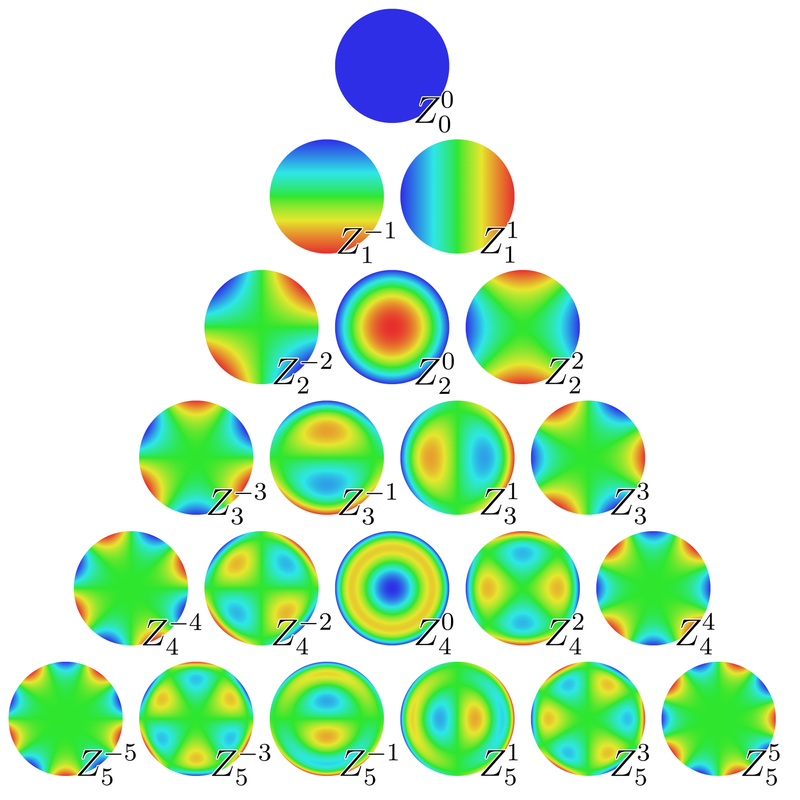
'kind'Used when using the Chebyshev method. Tells whether Chebyshev polynoms of the 1st or 2nd kind should be used.
'nGauss'Used when using the Gaussian method. The value is the parameter used with the imgaussfilt function that makes the blurred image to be subtracted. The larger this value, the lesser the flatten effect.
'nGauss = 100'is the default value, and a good starting value.'threshold'It is common to observe thick objects within the field of view of the microscope, like eukaryotic cells. Such objects would contribute to the moment computation while they should not. The moment should only consider distorsion of the background. The flatten function can be used to compute the moments only stemming from the background of the image. For this purpose, the code has to determine which part of the image is the background (or reciprocally, which part of the image is the object). For this purpose, a segmentation procedure is used, optimized for the study of eukaryotic cells. The procedure involves a free parameter that is specified using this
'threshold'parameter. A value a 1 is a good starting value.'mask'For some samples, the automatic segmentation procudure that is used when setting a value to
thresholdmay be uneffective. In this case, one can specify a mask, as a matrix of the same size as the image, with 0 and 1 values, where the 1 values define to the background area. This mask is to be built by the user itself in the main PhaseLAB file before calling the function flatten. See the Background flattening tutorial for more information on how to create a mask, and use thethreshold,nGauss,cut, andinvertparameters.'display'Equals true or false. If true, the segmentation of the background is displayed, as a means to visually check it is effective.