QLSIprocess (Interfero class method)
Process and return the intensity and wavefront images.
QLSIprocess
Process and return the intensity and wavefront images.
Synthax
% prototypes
Im = QLSIprocess(Itf, IL);
ImList = QLSIprocess(ItfList, IL);
ImList = QLSIprocess(___, Name, Value);

% examples
Im = QLSIprocess(Itf, IL,...
        "Fcrops", [], ...
        "method", 'Tikhonov', ...  % 'Tikhonov', 'Errico', or 'CPM'
        "defintion"; 'high', ...  % 'high' or 'low'}
        "Fcropshape", 'disc', ...  %'disc' or 'square'
        "Smatrix", [], ...
        "apodization", [], ... % true, 1, or the width of the apodization in px
        "saveGradients", false, ...
        "remotePath", [], ...
        "Tnormalisation", true, ... % or false or 'subtraction'
        "RemoveCameraOffset", false, ...
        "auto", true, ...   % Find automatically the spot of highest intensity
        "noRef", false, ... % Do not consider the Ref interferogram to compute the DW and OPD images
        "CGdistanceList", [], ...
        "resetCrops",  false, ...
        "display",  false, ...  % display the crops, even when automatic
        "unwrap", false);
Description
Method of the class Interfero that transforms the interferograms into intensity and wavefront images. As a second input, the illumination must be specified.
The method also works with an Interfero array, and returns an ImageQLSI array: ImList = QLSIprocess(ItfList, IL);
Name-value inputs
"Fcrops"Enables the use of predefined crops in the Fourier space, meaning that the automatic detection of the diffraction orders is cancelled. Predefined crops normally originate from a previous QLSIprocess use. When processing an Interfero object using QLSIprocess, the crops are saved as a property of the returned ImageQLSI object. Here is an example:
IM1 = QLSIprocess(Itf1, IL);
IM2 = QLSIprocess(Itf2, IL, "Fcrops", IM1.Fcrops);
"method"Selects the integration method used to get the wavefront image from the two gradients.
The Tikhonov method uses the grad2surf toolbox developed by Matthew Harker and Paul O’Leary. It is fast and does not create artefacts on the borders of the images.
The Errico method uses the intgrad2 toolbox developed by John D’Errico. It is slower than Tikhonov.
The CPM method uses the standard integration algorithm based on Fourier tranforms:
It is fast, but occasionally creates rebounds on the boundaries of the wavefront images:
"defintion"Tells whether the process gives high definition or low definition images.
There is neither more information nor more spatial resolution in the high-definition images. However, the images look much better in this mode. Here is an example of high versus low definition images:
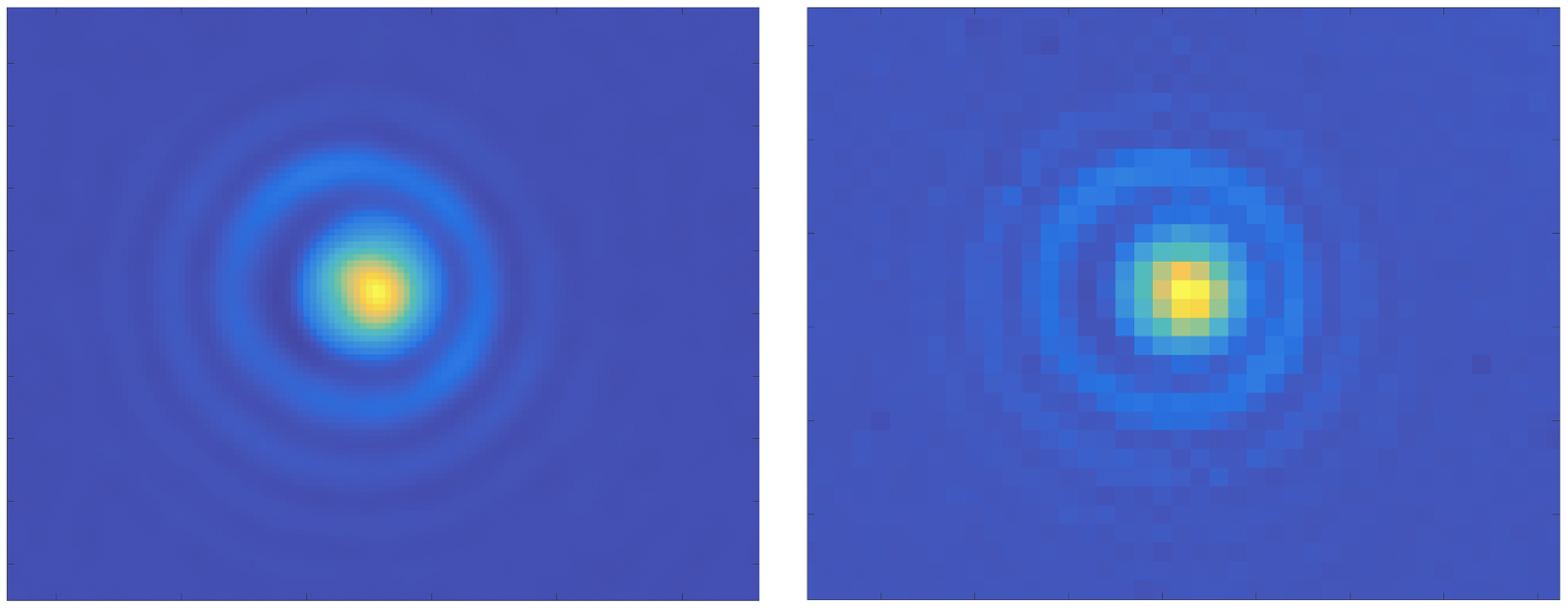
High- versus low-definition algorithm, with the wavefront image of a nanoparticle.
"Fcropshape"Tells whether the crops in the Fourier space are circular (by default) or square. Does not change much the processed images.
"apodization"Performs an apodization on the interferogram images to avoid possible artefacts after Fourier transforms. By default, when the value is 1 or true, the apodization is 20 px wide. For another width, the value should equal the width in pixels. Here are some examples:
Im = QLSIprocess(Itf, IL, "apodization", false); % no apodization
Im = QLSIprocess(Itf, IL, "apodization", true);  % apodization of 20 px
Im = QLSIprocess(Itf, IL, "apodization", 40);    % apodization of 40 px
"saveGradients"Save the gradients with the properties DWx and DWy of the returned ImageQLSI object.
Im = QLSIprocess(Itf, IL, "saveGradients", true);
dynamicFigure('ph', Im.DWx, 'ph', Im.DWy)
"remotePath"If not empty, the intensity and wavefront images are not saved in the RAM of the comptuer, but on the hard disk. The value of remotePath specifies the folder where the images should be saved. It is useful when working with a large set of images, likely to saturate the RAM.
"Tnormalisation"Sets the way the intensity image is normalized. By default, it is divided by the intensity image of the reference image. To avoid that, one can set the value to false. One can also choose to normalize by subtracting the intensity image of the reference, using the value 'subtraction' (relevant when working with fluorescence images for instance).
"RemoveCameraOffset"Removes the offset on the interferogram images, set by the camera constructor. Useless for the reconstruction of the wavefront image. Relevant when quantitative intensity images are seeked. The offset value to substract is indicated in the specification file of the camera included when building the Microscope object.
"auto"If true, finds automatically the 0 and 1st order spots in the Fourier space. If false, a window opens to ask the user to click on the spots. See the Process experimental images section for more details.
"noref"If true, forgets about the reference interferogram in the intensity and wavefront images processing.
"CGdistanceList"If the input is an Interfero array, and if the images have been acquired with various values of grating-camera distances \(d\), the list of \(d\) values can be indicated as a double array here. The array must have as many values as the number of Interfero objects.
"resetCrops"Resets the crops between each processed interferogram, to make sure the algorithm enables the user to click for each image when "auto = false".
"unwrap"Uses an unwrapping algorithm. Not useful in most cases. Slows down a bit the image processing. Algo based on this Matlab package.